

How To Open My Computer Without Password In Windows 7
Most of united states of america prefer to secure PC with a login countersign. The password recommended is a strong i which in turn might be vulnerable to exist forgotten. And so what if you lot forgot the password yous set, how to login to Windows 7 without countersign? No worries, just read this article until the cease to be informed about several effective methods y'all can use, only check it out.
Method ane: Login to Windows vii without Password in Condom Mode
If y'all still can admission your Windows vii computer with built-in ambassador in Rubber Mode, then you tin try this manner. Setting Windows 7 calculator to Condom mode with command prompt will let you to make use of built-in administrator to remove Windows 7 login password by running command prompt. However, this method will be a piffling bit complex for a computer novice, and a wrong lawmaking volition lead to the loss or damage of data.
Step 1: Restart the machine yous intend to get into Windows 7 without password and printing F8 without releasing to enter "Avant-garde Boot Options".
Step two: Among the 3 safety modes which tin can exist seen from the screen, choose "Safe Manner with Control Prompt" and press "Enter".
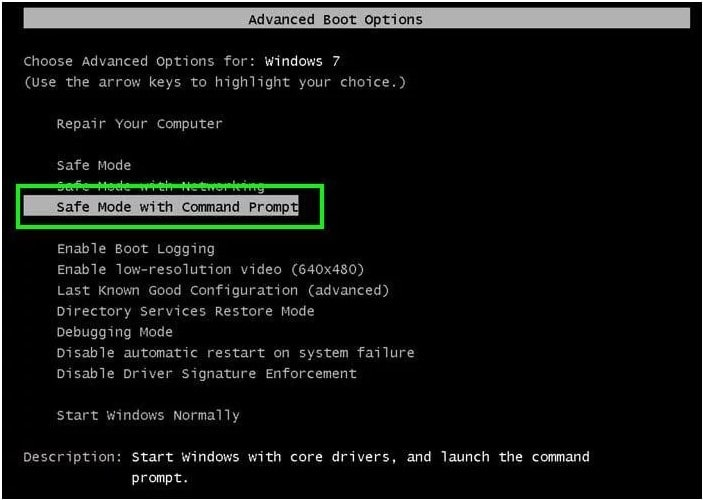
Step three: On the new command prompt window type "net user" and printing "Enter". After which all the users business relationship on the Windows 7 volition exist displayed. Select the login user and proceed.
Pace iv: Finally, use the net user command and remove Windows 7 login user password. Once this is finished, you'll exist able to login into Windows seven without countersign.
Method 2: Login to Windows seven without Password Using the Hidden Admin Business relationship
This is yet another constructive method y'all can try to get into Windows 7 without password. Windows 7 and earlier versions have an administrator account which is invisible. The purpose of this Subconscious Admin account is to salvage you during an emergency like when you forgot your login countersign. Beneath is how it works:

Remember, this method is of help only if the said admin account is activated. By default, it is deactivated on some Windows seven system.
Step 1: Power on the PC you want to login without password. Continuously printing the "Shift" key 5 times one time the login screen comes to sight. Hidden Admin business relationship will appear or activated on the screen.

Pace 2: Enter Windows 7 without password using this hidden admin account.
Step 3: Once you lot take accessed the PC, right-click the "This PC" icon and select managing director option from the driblet-downwards carte du jour. At this indicate, the estimator management operating window is on.
Step four: Gyre downward the computer management menu and select "Local Groups and Users" tab and the "Users" under information technology. Then right-click on the target user account and cull "Set Password".

Step 5: Once you've completed setting up the new password, log out from subconscious Admin account and sign in over again using the newly created countersign.
Method 3: Login to Windows seven without Countersign Using a Reset Disk
This tertiary method serves those who accept a reset disk on manus already. The reset disk can be used to reset or remove forgotten password allowing y'all to login into Windows 7 without password. Beneath is the step past step guide about how to utilize it.
Step ane: Ability on the countersign forgotten calculator and blazon knowingly the wrong password for the login user and click "OK" if prompted wrong. Then open password reset sorcerer past clicking on "Reset password" link under password dialogue box.

Step 2: Insert the password reset disk into the PC and cull recovery disk from drib-down box and click Next.

Stride 3: You'll be prompted to reset the password for the login user. Type the new countersign you want to reset or simply go out all the password input fields blank. Then finalize by clicking "Side by side" and "Terminate".

At this betoken, you lot have managed to get into a Windows vii figurer with a new password or without a countersign!
Method 4: Login to Windows seven without Password Using Passper WinSenior
If all methods in a higher place failed, here is another option that is worth trying. This is the 100% working and easiest way to log into Windows vii without password. Passper WinSenior is a professional person tool which was designed specifically to reset or remove login and admin password even if yous've lost or forgotten the current password for Windows 10/viii.1/8/7.
You tin can create a new countersign reset disk with CD/DVD or USB by using this programme. Existence a robust and meridian-notch tool of its kind, Passper WinSenior can regain access to your locked PC without reinstalling or reformatting Windows 7 system, hence no information loss at all. What's more, it offers detailed on-screen instructions, which get in pretty like shooting fish in a barrel to follow even for tech newbies. Below are the detailed steps.
To get started, please download and install Passper Winsenior on your computer first.
Free Download For Win 10/8.i/8/7/XP
Footstep i Insert a blank and bootable CD/DVD/USB flash drive into an attainable computer, launch Passper WinSenior and click "Create" button to start creating a password reset disk. One time the process completed, only eject it.
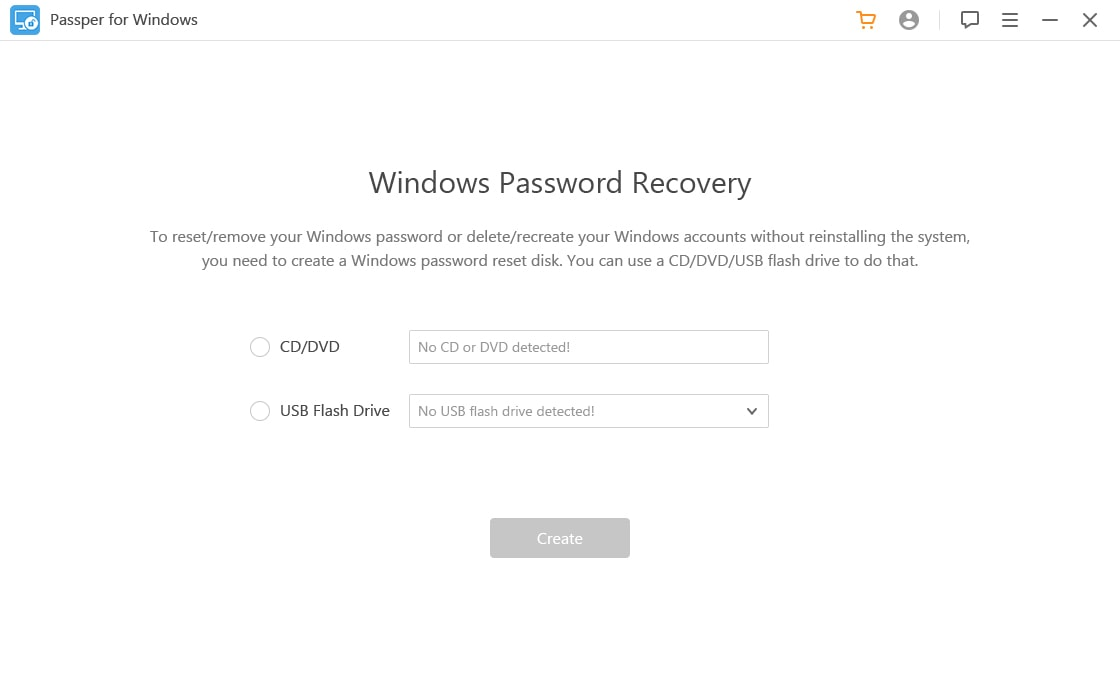
Footstep ii Put the created reset disk into the locked figurer, press the special cardinal to enter the boot menu. When you successfully get into boot carte du jour, yous will see the interface of the program.

Footstep 3 Next, choose a system and select "Remove Windows Password" pick, so find the target user account you desire to remove its password.

Wait patiently equally the programme inverse the selected account. It will take no fourth dimension to completely remove the password successfully. You can now restart your estimator and confidently open Windows 7 without password.
Pretty piece of cake, isn't information technology? Only 3 steps, you can get into the locked computer without reinstalling and reformatting operating organization. Below is the video guide of Passper WinSenior, which help you better understand information technology.
Extra Tips: How to Avert Forgetting Passwords E'er Again
Hither are some tips and tricks about how to advoid forgetting your Windows password:
-
Employ the often used info to set the password, like your name, your altogether and other things.
-
Write downwards your password on notebook or your phone. If you lot forget the login password, you can yet notice it on your notebook.
-
Create a Windows password reset deejay in advance. In one case y'all tin can't remember what the login password is, it could help you out.
-
Set your user account to login to Windows 7 automatically without entering a countersign.
Conclusion
In summary, all methods involved to log into Windows seven without a password are all feasible and secure. Merely picking the right method is a half to success. For a directly forrad way of solving Windows 7 password issues effortlessly, nosotros advise you to try Passper Windows Password Reset tool.
Source: https://passper.imyfone.com/windows-7/how-to-login-to-windows-7-without-password/
Posted by: brownwitheme.blogspot.com
0 Response to "How To Open My Computer Without Password In Windows 7"
Post a Comment